



Orchestrate work end to end
Maestro Flow is the developer-first way to orchestrate with coding agents. Agents, APIs, data, documents, and people as one artifact, built fast on a single canvas and run on a durable, observable runtime.
Build agents and automations code-first or low-code, with tools that connect apps, systems, and data end to end. Free forever with UiPath Community License.










CLI scaffolding, AI-first development, or a visual canvas—pick the path that matches how you build.
# Install the uipath SDK package
> pip install uipath-langchain

# Authenticate to UiPath platform
> uipath auth
✓ Authentication successful.

# Verify the uipath installation
> uipath -lv
uipath-langchain version 0.11.19

# Create a standard UiPath coded agent in the directory
> uipath new my-agent
⠋ Creating new agent my-agent in current directory ...
💡 Initialize project: uipath init
💡 Run agent: uipath run agent '{"topic": "UiPath"}'

# Initialize the local project and create entry points
> uipath init
⠋ Initializing UiPath project ...

> uipath run agent '{"topic": "UiPath"}'
▶ START
output
└── report: **UiPath Overview Report**

    **Introduction:**
    UiPath is a leader in agentic automation, combining AI agents, robots,
    orchestration, and governance to help enterprises run complex business
    processes securely and at scale...
✓ Successful execution.
# Install the UiPath CLI
> npm install -g @uipath/cli

# Install relevant CLI tools from the UiPath toolset
> uip tools install codedagent-tool
> uip skills install --agent claude
# Authenticate and initialize your project — your coding
# agent can operate the commands from here using the
# skills and CLI installed above
> uip login
> uv venv --python 3.13
> source .venv/bin/activate    # On Windows: source .venv/Scripts/activate
> uv init
> uv add uipath-langchain

# Point the CLI at your environment and generate the
# UiPath schema
> uip codedagent setup
> uip codedagent init

# Give your coding agent the creation prompt, for example...
"Create a UiPath AI agent using LangGraph to provide /
a 2-sentence summary for a topic. The agent should /
use an 'agent' entrypoint to accept a 'topic' string /
and output a 'summary' string. Create an input.json /
with a sample input for testing."

# Once your agent finishes, debug your agent on the
# UiPath platform
> uv sync
> uip codedagent run agent --file input.json
> uip codedagent run agent '{"topic":"LangGraph agents"}'
▶ START
output
└── ...
✓ Successful execution.

# Pack and publish your agent to UiPath
> uip codedagent deploy
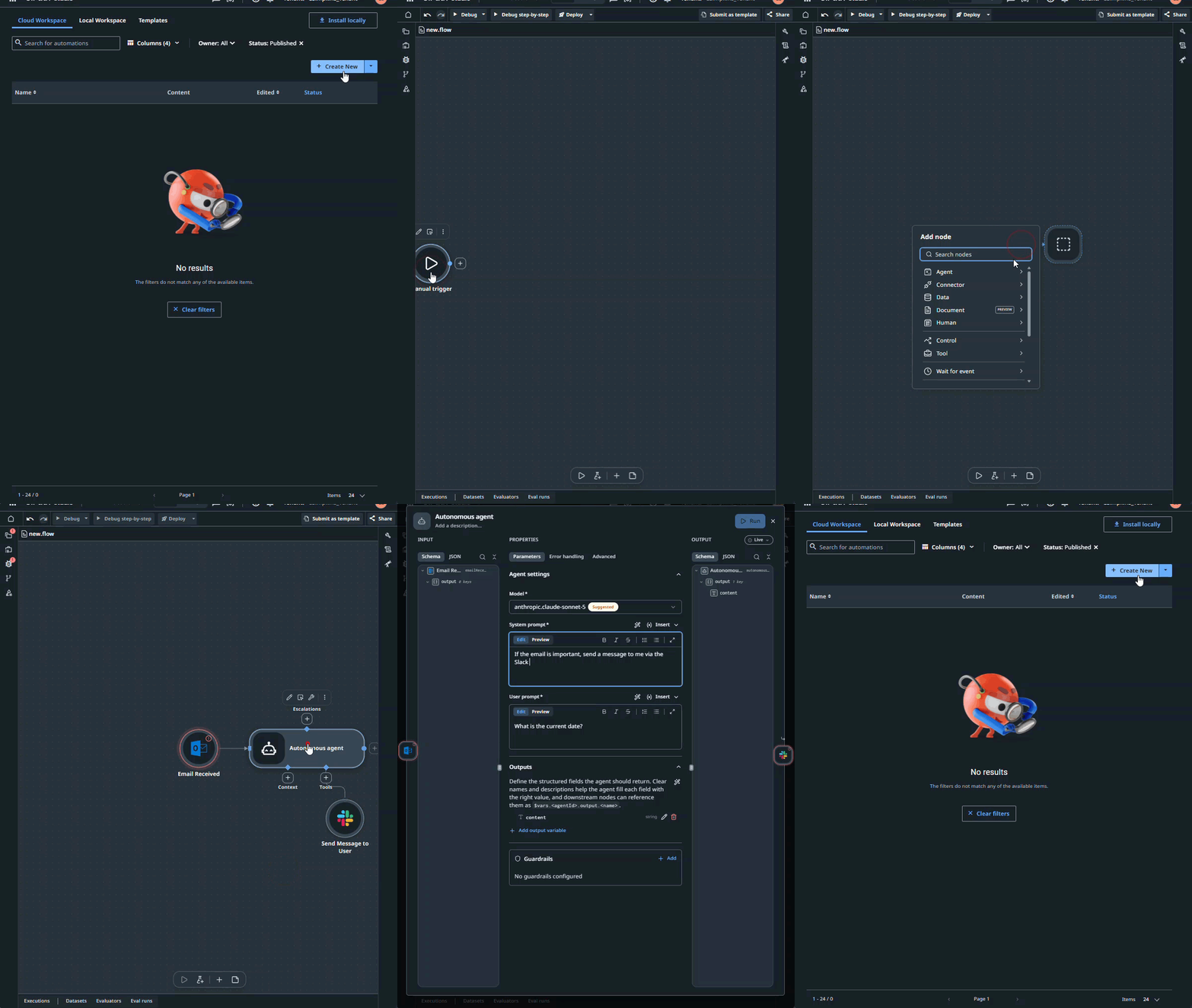
Maestro Flow is the developer-first way to orchestrate with coding agents. Agents, APIs, data, documents, and people as one artifact, built fast on a single canvas and run on a durable, observable runtime.
Go code-first with the Python SDK, or prototype in Agent Builder's low-code canvas and export to code when you need deeper customization. Either path gets you production-ready agents.
Automate any desktop or web application with industry-leading UI automation, with native support for Windows and macOS.
Build API-first automations that run on-demand, on schedule, or against real-time events.
Extract and structure data from any document or communication with UiPath IXP. Get a reliable, production-ready document intelligence layer without the build and maintenance overhead.
Automate testing for SAP, Salesforce, Epic, Oracle, and 190+ other technologies with self-healing execution that adapts as apps change.
Build enterprise-grade apps for human-in-the-loop scenarios and custom workflows, with low-code or fully coded options.
Ecosystem & integrations
Pre-built and custom integrations. Open standards. Build on the stack you already use.














UiPath Developer Community
Join the world's largest and most active automation community.
Ask questions, get support, and share best practices with other UiPath developers.
OpenLearn UiPath for free, explore career paths, and get recognized with professional certifications for every skill level.
OpenJoin meetups, hackathons, and community chapters near you.
OpenExplore UiPath guides. Build your knowledge. Find the tools you need.
OpenBuild and orchestrate agents and automations in UiPath Studio or your own IDE, code-first or low-code. Free for individuals and small businesses.
UiPath is a business orchestration and automation platform for orchestrating end-to-end processes and cases—coordinating agents, robots, APIs, data, documents, and people. It runs reliably at enterprise scale, whether you build with low-code, code, or both.
Yes. The UiPath Community License is free for individuals and small businesses, with no credit card required. It’s subject to the Community Agreement, available here.
The Community License is the free version of the UiPath Platform—offering access to build, run, and orchestrate agents and automations at no cost.
No. The free trial is a 60-day trial of UiPath Enterprise. The Community License is free with no time limit, so if you’re building or learning on your own or at a small company, that’s the one to choose.
Yes. Students and individuals can use the Community License for free to learn and build, and UiPath Academy offers free courses and certifications.
A real environment to build in, not a time-limited trial: UiPath Studio and the UiPath SDKs, one unattended robot, and monthly usage credits that are shared across the capabilities you use and reset each month. For the full breakdown, see the Community Edition announcement.
Create a free UiPath account, then build right away in Studio Web—in your browser, nothing to download—or download Studio Desktop for Windows from your account. Create a free UiPath account.
After creating a free account, download Studio Desktop and run the installer on Windows. Prefer not to install anything? Use Studio Web directly in your browser.
Yes. Bring your own models, tools, and code, and use coding agents like Claude Code, Cursor, and Codex.
You can build and orchestrate end-to-end processes, build AI agents in Python or visually, automate desktop and web interfaces with RPA, connect apps and systems via APIs, process documents, test enterprise software, and more—with enterprise-grade governance built-in.
Nothing beats experimentation, which is why the Community License is free for builders of all skill levels. Once you sign up, explore UiPath Academy for free guided courses, the Documentation for reference, and the Community Forum to ask questions.
Start free with Community. Move to Enterprise when you need more scale, more users, or enterprise support.
Get started
Free tier. No credit card required. Start building agentic workflows and automating processes on the UiPath Platform.
Start your journey with UiPath. Choose one of three paths to get going:
Explore platform capabilities.
Design and orchestrate long-running business processes with adaptive case management and human-in-the-loop steps. Maestro handles processes that span days, systems, and people—with full visibility and governance across every stage.
Two orchestration modes: Process Orchestration for structured, step-by-step workflows; Agentic Case Management for adaptive processes where the path is determined at runtime.
UiPath Capabilities:
AI-native IDE for building agents, automations, and apps across one governed ecosystem. Studio covers the full development surface: AI agents, process orchestration, UI automation, API workflows, and apps—with low-code, pro-code, and AI-first development options.
UiPath Capabilities:
Build and deploy directly from your IDE—no context switching required. Install the CLI, authenticate, and choose your path: Python SDK for building agents and orchestrations.
Bring your framework—LangGraph, LlamaIndex, OpenAI Agents, or plain Python—and deploy to Orchestrator as a standard package. Same governance, scheduling, and observability as any UiPath process. No new mental model.
UiPath for Coding Agents lets Claude Code, Codex, Cursor, Copilot, and others scaffold and deploy projects directly.
UiPath Capabilities:
Getting started:
npm install -g @uipath/cli (npm), irm https://download.uipath.com/uipath-cli/install.ps1 | iex (PowerShell), or curl -fsSL https://download.uipath.com/uipath-cli/install.sh | bash (Bash)uip skills installuip loginUiPath is the enterprise platform for building AI agents, orchestrating business processes, and running both in production—with the governance, observability, and compliance infrastructure that enterprises require.
Trusted by 10,000+ organizations across financial services, healthcare, and supply chain. Seven consecutive years as the Gartner RPA leader. Now the platform for the agentic era.
UiPath Capabilities:
Create AI agents, automations, and apps.
Design end-to-end business processes that span systems, teams, and time—with adaptive case management, persistent state, and human-in-the-loop approvals built in. Process Orchestration handles structured, step-by-step workflows; Agentic Case Management handles the adaptive, judgment-required cases where the path isn't fixed until it runs.
The UiPath orchestration layer handles what most platforms leave to you: pausing and resuming long-running processes, routing exceptions, maintaining audit trails, and ensuring every step is traceable.
UiPath Capabilities:
Start where it makes sense for you. Go code-first with the Python SDK, or prototype in Agent Builder's low-code canvas and export to code when you need deeper customization. Either path gets you production-ready agents with guardrails, retry logic, observability, document understanding, evals, and more included—no bolt-ons required.
Every action logged. Every escalation traceable. Compliance built in from the start—not added later.
UiPath Capabilities:
Automate any desktop or web application with industry-leading UI automation—with native support for Windows and macOS. Bring resilience and intelligence to your automations with agentic AI: Healing Agent provides self-healing so your automations adapt to unexpected interface changes, while ScreenPlay translates natural language instructions into self-driving UI automations.
UiPath Capabilities:
Build API-first automations that run on demand, on schedule, or in response to real-time events. Exposed as callable services, they encapsulate reusable integration logic with speed, security, and governance. Whether triggered by agents, apps, or people, API Workflows make system-to-system execution simple, scalable, and ready for anything.
UiPath Capabilities:
Extract and structure data from any document or communication with UiPath IXP. Get a reliable, production-ready document intelligence layer without the build and maintenance overhead.
UiPath Capabilities:
Automate testing for SAP, Salesforce, Epic, Oracle, and 190+ other technologies with self-healing execution that adapts as apps change. Built-in agentic AI helps developers and testers generate, run, and maintain UI and API tests faster, all in one framework connected to CI/CD pipelines.
Designed for real enterprise environments, UiPath Test Cloud helps teams create resilient automation faster, reuse components across teams, and maintain coverage as applications evolve.
UiPath Capabilities:
Build enterprise-grade apps for human-in-the-loop scenarios, custom business workflows, and front-end experiences. Choose low-code—with RPA Apps or JS Apps—for speed and simplicity, or coded apps in C#, JavaScript, or Python when you need advanced scenarios or custom components. Deploy in one click and share for desktop and mobile use.
UiPath Capabilities:
Build and deploy directly from your IDE—no context switching required. Install the CLI, authenticate, and choose your path: Python SDK for building agents and orchestrations.
Bring your framework—LangGraph, LlamaIndex, OpenAI Agents, or plain Python—and deploy to Orchestrator as a standard package. Same governance, scheduling, and observability as any UiPath process. No new mental model.
UiPath for Coding Agents lets Claude Code, Codex, Cursor, Copilot, and others scaffold and deploy projects directly.
UiPath Capabilities:
Getting started:
npm install -g @uipath/cli (npm), irm https://download.uipath.com/uipath-cli/install.ps1 | iex (PowerShell), or curl -fsSL https://download.uipath.com/uipath-cli/install.sh | bash (Bash)uip skills installuip loginConnect with fellow developers.
Trusted by 3.3M+ developers and 10,000+ enterprises, UiPath has the world's largest and most active automation community — join us!
Get involved: