Abstract image

UiPath Studio

Design, build, and scale agentic, robotic, and API-driven workflows

One AI-native development experience for agents, automation, and apps. Low-code, code-first, AI-assisted, or mix.

Design, build, and scale agentic, robotic, and API-driven workflows 

One AI-native development experience for agents, automation, and apps. Low-code, code-first, AI-assisted, or mix.

The entire automation surface, all in Studio

Studio brings AI agents, RPA workflows, API integrations, apps, and process modeling together, so you ship faster, with full governance.

Agentic process

IMG01 Design and Optimize Processes

Coordinate agents, robots, and people in one process

Built-in business rules, routing logic, and a full audit trail. Purpose-built for end-to-end processes like Order-to-Cash, Procure-to-Pay, and employee onboarding, where compliance, repeatability, and standardization are requirements, not nice-to-haves.

AI agents

Product - Studio - Capabilities - AI Agents

Production-grade agents, with guardrails built in

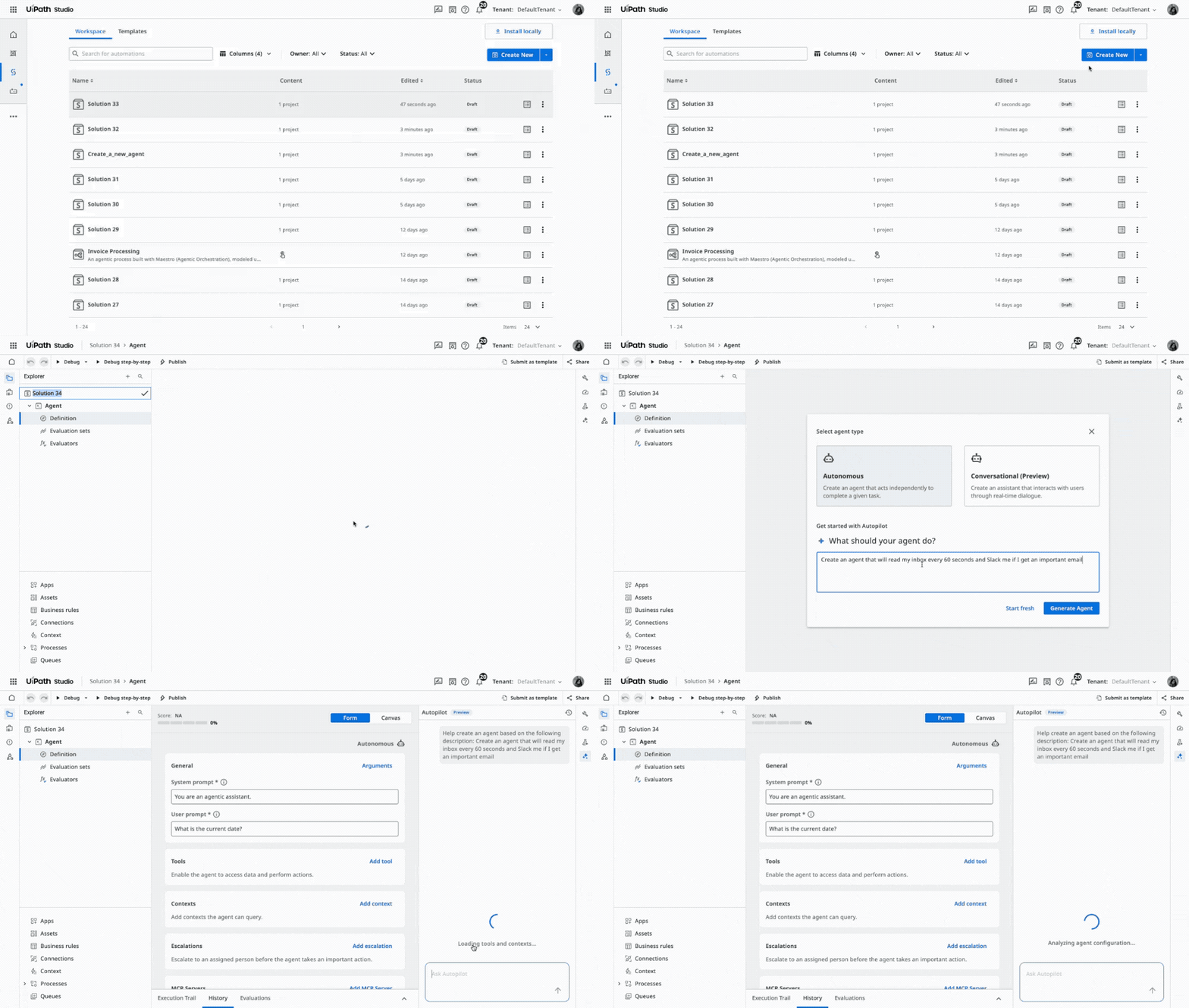
Start fast with pre-built templates or build from scratch in a low-code experience. Customize with instructions, context, tools, escalation paths, and evaluations. Get smarter guidance from Autopilot and Agent Score & Optimizer. Deploy to the UiPath governed runtime, no SDK required.

RPA workflows

Product - Studio - Capabilities - RPA Workflows

Industry-leading UI automation, supercharged by agentic AI

AI Computer Vision and robust selectors across Windows and macOS. Ready-to-use activities for UI automation, IT automation, IDP, Integration Service, and GenAI. ScreenPlay turns natural language into self-driving UI automations. Healing Agent adds intelligent self-healing at runtime.

API workflows

UiPath API Workflows - Create API workflows in minutes.

Build, manage, and scale system-to-system integrations

API workflows run on demand, on schedule, or in response to real-time events. Agents and robots call them reliably. Abstract complex API chaining into composite, callable services. Autopilot generates workflows from natural language and creates expressions and docs as you build.

Apps

Product - UiPath Apps - Low-code: Give your RPA the user interface it deserves

An enterprise-grade front end for your automations

Low-code or coded. JS Apps (coming soon): next-gen low-code builder, JavaScript-powered, browser-native. RPA Apps: full RPA capabilities embedded in your apps. Coded apps (new): full creative control when UX outgrows the canvas. One-click deploy across desktop and mobile.

Preview Studio now

Take a sneak peek into Studio. Drag activities into the canvas and debug an automation live.

UiPath Studio
Autopilot
Build an automation that reviews and processes high-value deals in the CRM
Autopilot
Built CRM Deal Review in Main.xaml:
Use Browser: Acme CRM
Type Into: Search “Enterprise”
Get Text: Deal Amount
If: Amount > $50,000
+4 more activities
Opens Acme CRM, filters deals > $50k, updates status, and notifies ops via email.
Ready to debug — click Debug to test the flow.
Autopilot can make mistakes. Double check the responses.
Main.xaml
1
Use Browser: Acme CRM Running Success Failed
2
Type Into: Search "Enterprise" Running Success Failed
3
Get Text: Deal Amount Running Success Failed
4
If: Amount > $50,000 Running Success Failed
5
Click: "Open Deal" Running Success Failed
6
Log Message: "Deal under threshold" Running Success Failed
7
Set Transaction Status: Reviewed Running Success Failed
8
Send SMTP Mail: ops@acme.com Running Success Failed
9
Connected
cloud.uipath.com
main
0↑ 0↓
Acme CRM — Sales Pipeline
Deals (12)
$284.5k
Pipeline
+12.3%
$48k
Won this month
+8.1%
67%
Win rate
-2.4%
SI
Enterprise Platform License
Stark Industries Jan 15
$125,000
Negotiation
WE
Annual SaaS Renewal
Wayne Enterprises Mar 2
$48,000
Closed Won
OI
Automation Suite POC
Oscorp Industries Feb 20
$35,500
Proposal
AC
Cloud Migration Services
Acme Corp Mar 8
$76,000
Negotiation
LC
AI Document Processing
LexCorp Mar 10
$52,000
Qualified
UC
Legacy System Integration
Umbrella Corp Feb 5
$18,000
Lost
Contacts (8)
TK
Tony Kim
CTO, Stark Industries
tony@stark.io
BW
Bruce Wayne
CEO, Wayne Enterprises
bruce@wayne.co
NO
Norman Osborn
VP Eng, Oscorp
norman@oscorp.com
JD
Jane Doe
CIO, Acme Corp
jane@acme.com
LL
Lex Luthor
CEO, LexCorp
lex@lexcorp.com
Tasks (5)
Follow up with Stark Industries on pricing
Today
Send Oscorp demo recording
Yesterday
Prepare Acme Corp migration proposal
Mar 14
Update Wayne Enterprises contract
Mar 2
Schedule LexCorp discovery call
Mar 1
Reports
42
Total Deals
+6 this month
24d
Avg. Close Time
-3d vs last
$12.4k
Avg. Deal Size
+$1.2k
SI
Stark Industries
Enterprise Platform License
Value$125,000
StageNegotiation
OwnerSarah Chen
Close DateMar 28, 2026
Probability72%
UiPath Studio
Acme CRM
Terminal
System Settings
11:42 AM 3/12/2026

Build your way: low-code, code-first, AI-assisted, or a mix

You don’t have to pick a lane. Studio supports all three build modes side by side, in the same project.

Stay in your workflow

AI-assisted

Build with Autopilot, or bring your coding agent of choice

Autopilot generates workflows, agents, and expressions from natural language, natively in Studio. Or bring Claude Code, Copilot, Cursor, or Gemini CLI: UiPath skills give them native understanding of Studio projects so output ships production ready.

CLI quickstart

Code-first

Coded agents, automations, and apps, directly in Studio

Write coded agents in Python (LangGraph, LlamaIndex, OpenAI Agents) and coded automations in C#. Connect to platform services via the UiPath Python SDK. Mix coded and low-code in the same project. Full debugging, unit testing, and package management built in.

Agent Builder Studio product animation

Low-code

Drag, drop, describe. The visual route from idea to working automation.

Drag-and-drop activities with sequences, flowcharts, and state machines. Natural-language expressions powered by Autopilot. Templates and Marketplace components to start from, not from scratch. Built for every skill level.

Stay in your workflow

AI-assisted

Build with Autopilot, or bring your coding agent of choice

Autopilot generates workflows, agents, and expressions from natural language, natively in Studio. Or bring Claude Code, Copilot, Cursor, or Gemini CLI: UiPath skills give them native understanding of Studio projects so output ships production ready.

CLI quickstart

Code-first

Coded agents, automations, and apps, directly in Studio

Write coded agents in Python (LangGraph, LlamaIndex, OpenAI Agents) and coded automations in C#. Connect to platform services via the UiPath Python SDK. Mix coded and low-code in the same project. Full debugging, unit testing, and package management built in.

Agent Builder Studio product animation

Low-code

Drag, drop, describe. The visual route from idea to working automation.

Drag-and-drop activities with sequences, flowcharts, and state machines. Natural-language expressions powered by Autopilot. Templates and Marketplace components to start from, not from scratch. Built for every skill level.

Production-ready by default.

Not a separate toolchain to assemble.

Source control, testing, CI/CD, governance, and environment management. Built into Studio, not bolted on.

Source control

Built-in Git. Branch, merge, and resolve conflicts without leaving Studio.

Testing & quality

Test Manager, data-driven testing, and mocking. Verify before production.

CI/CD pipelines

CLI-based packaging, ready for your existing CI/CD toolchain.

Reusable libraries

Create, version, and share libraries across teams via Orchestrator.

Governance & Ops

Enforce coding standards, analyzer rules, and publishing policies.

Environment mgmt

Manage dev / test / prod configs, credentials, and asset separation.

Working in code? Find more details on UiPath Developer Hub.

Two ways into Studio. Same Studio ecosystem.

Pick the IDE that matches what you’re building. They share licensing, governance, and the platform underneath.

Studio Desktop

Windows IDE for advanced RPA and desktop automation

Windows IDE for complex RPA, desktop automation, coded workflows, and working with coding agents. Best for: desktop and Citrix UI automation, OS-level access, advanced debugging, state machines, flowcharts, reusable libraries, coded test cases, and integration with UiPath for Coding Agents (Claude Code, Copilot, Cursor, Gemini CLI).

Studio Web

Browser-based IDE for agentic and API-first automation

Browser-based IDE for agentic and API-first automation. Mac and Windows compatible. Best for: AI agents, API workflows, agentic process modeling, apps, and cross-platform teams. Cloud-native, continuously updated.

Studio builds it. The Platform runs it.

Everything you build in Studio works with the rest of the UiPath Platform: governance, orchestration, observability, and enterprise-scale runtime.

Everything you need to go deeper

Senior man in an orange shirt holding a coffee mug and checking his smartphone beside a laptop in a stylish loft home, illustrating digital banking and everyday tasks simplified by UiPath agentic automation and AI agents.

Resource

Templates

Ready-to-use automation templates from UiPath engineers and the community.

Browse templates
Diverse colleagues laughing together during a relaxed meeting at a conference table, conveying inclusive workplace culture and collaboration supported by UiPath agentic automation and AI agents.

Resource

Documentation

Reference docs and how-to guides for Studio and the UiPath Platform.

Read the docs
A red passenger train crosses a stone viaduct through a snowy alpine forest and mountains, depicting rail transportation and travel infrastructure that UiPath agentic automation and AI agents help optimize.

Resource

Developer Hub

Builder tools, SDKs, UiPath for Coding Agents, and more.

Explore the hub

UiPath Studio: common evaluation questions

Answers for developers, architects, and IT teams evaluating UiPath Studio.

  • Yes. The UiPath Community Edition is a free version of Studio for individuals, students, and small teams. It includes Autopilot and access to Studio Desktop and Studio Web. Paid Enterprise tiers (Express, Basic, Plus, Pro) add governance, source control, advanced debugging, and CI/CD.

  • Studio Desktop is the Windows IDE for complex RPA, desktop automation, and coded C# workflows. Studio Web is the browser-based IDE for AI agents, API workflows, agentic process modeling, and apps, and runs on Windows and macOS. Same licensing, same governance, same platform.

  • Yes, through Studio Web. Studio Web is the browser-based IDE for agentic and API-first automation and runs on macOS as well as Windows. Studio Desktop is Windows-only.

  • C# for coded automations and coded apps. Python for coded agents (LangGraph, LlamaIndex, OpenAI Agents). JavaScript for coded apps. Low-code and AI-assisted modes generate workflows without requiring a language choice.

  • Every workflow, agent, and API call runs under platform governance: role-based access control, workflow analyzer rules, publishing policies, audit trails, and secret management. The same controls apply across agents, robots, APIs, and apps.

  • Run on Automation Cloud as SaaS, or self-host with Automation Suite across cloud, on-premises, or hybrid environments. Studio publishes to the same governed runtime in both cases.

Ask AI about...Ask AI...