Six new capabilities are coming to performance testing in UiPath Test Cloud

Summarize:
Starting today, there are six new performance testing capabilities in UiPath Test Cloud. Every one of them was shaped directly by what we've learned from real customer implementations over the past two quarters. In this blog post, we will walk through what's shipping, why we built it, and what it means for your team.
Why now
Functional testing answers one question: does the application work? Performance testing answers a richer one: does it keep working once real users, peak traffic, and business-critical workflows put it under pressure?
As release cycles compress and AI-assisted development pushes more code into production faster, that second question matters more than ever—and it's exactly where UiPath Test Cloud is investing to help every team keep up, not just specialists with scripting expertise.
UiPath Test Cloud's answer has been to make performance testing something every tester can do, not just a dedicated performance engineering team: reuse the functional automations you already have, let AI agents handle the planning and analysis heavy lifting, and keep humans in control of objectives and release decisions. This next round of updates builds on that foundation, drawing directly on what we've learned from real customer implementations over the past two quarters.
Across those implementations, five themes came up again and again: making sure automations are fully compatible before a run, sizing load infrastructure with confidence, keeping metrics flowing smoothly through corporate firewalls, giving teams direct visibility into robot logs, and letting regulated customers generate load from their own private cloud. Each of the capabilities below answers one of those themes directly.
Six new performance testing capabilities
Workflow analyzer
Workflow analyzer scans your automation before a run and flags unsupported activities and version mismatches up front.
We built workflow analyzer because teams wanted more confidence that their reused functional test cases would run smoothly from the very first attempt, with any unsupported activities or version mismatches surfaced before a load test starts, not during it.
For your team: more confidence going into every run, and less time spent investigating issues that have nothing to do with actual application performance. You get a clear picture of what needs attention before you spend robot minutes on it, not after.

Capacity planner
Capacity planner runs a short “dry run”: a handful of small, safe load probes that measure how CPU and memory respond as load increases, then extrapolates a safe virtual-user recommendation from that trend—before you ever run a full-scale test.
We built capacity planner because we know how many virtual users a given machine can safely support is one of the most valuable things to get right early on when planning a performance test, especially for on-premises environments where hardware varies widely.
For your team: a data-backed capacity number in minutes, with built-in guardrails (safety thresholds, conservative CPU discounting, hard caps by application type) so the recommendation is always as safe as what's already been proven on your own hardware.

Firewall-safe HTTP metrics
Metrics now travel over the same outbound HTTPS channel your robots already use to talk to UiPath Orchestrator—no new firewall rules, no new open ports, no extra sign-off from network security teams.
We built firewall-safe HTTP metrics because customers wanted metrics collection to work smoothly from day one, even inside tightly governed corporate networks where every new outbound connection needs its own review.
For your team: one less procurement and security review cycle standing between your team and your first performance test, particularly in regulated or tightly locked-down enterprise environments.

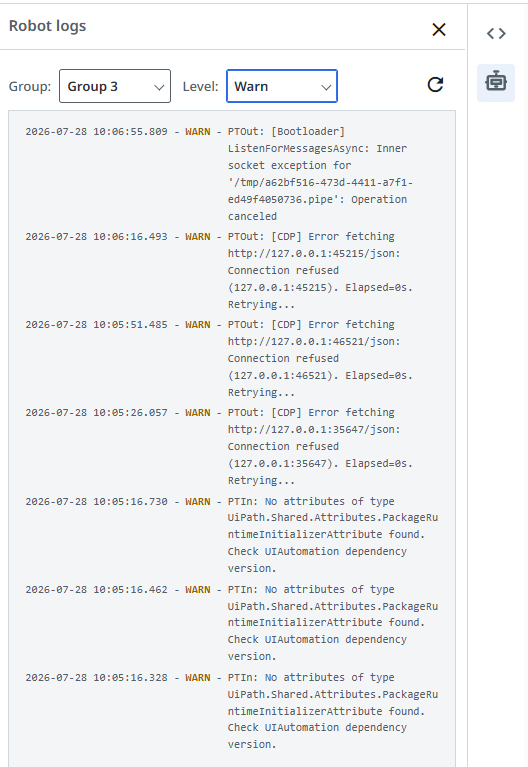
Robot logs, in-app
Robot logs are now filterable by group and severity level directly inside the performance testing interface.
We built in-app robot logos because teams wanted a faster way to understand what happened during a run, right from the Performance Testing UI, instead of switching over to robot logs somewhere else.
For your team: faster failure triage. You can go from “this run failed” to “here's why” without switching tools or context.
Elastic robot pools
Elastic robot pools let you generate load directly from your own Azure, Amazon Web Services (AWS), or Google Cloud private cloud capacity, scaling load injectors up and down as a test requires.
We built elastic robot pools because regulated customers need the flexibility to generate load from environments they fully control, keeping pace with their data residency and compliance requirements.
For your team: a path to enterprise-grade performance testing that fits any compliance posture, without giving up the elasticity of cloud-based load generation.

Persona-based performance reports
Every performance test run now generates a persona-based report with a dedicated view for each stakeholder who needs to act on the results: program managers get a ship-it-or-not call, developers get what's broken, InfraOps gets whether it's an infrastructure issue, and QA/testers get what needs to be retested.
We built persona-based performance reports because teams wanted performance results that translate directly into a decision, especially non-specialists who needed more than charts and service-level objective (SLO) tables to know what to do next.
For your team: results that translate into decisions immediately, for whoever must make the decision—without a specialist translating the dashboard for everyone else first.

Where this is headed
Zoom out, and this release is one step in a larger story about what performance testing becomes inside UiPath Test Cloud.
Performance testing is part of a bigger vision at UiPath: the dark testing factory—a self-operating quality system where AI agents and automations handle the routine, repetitive work of testing end to end, while humans move out of the button-pushing loop and into the knowledge loop: setting policy, resolving ambiguity, and stepping in on the exceptions that actually need judgment. That model takes shape fastest around functional and regression testing, orchestrated through UiPath Maestro™, and anchored in UiPath Test Manager as the shared system of record.
Performance testing sits on the same path: performance risk becomes another signal the factory reasons about alongside functional risk—the same shared knowledge layer deciding not just what to test next, but whether a change needs a performance check at all before it ships.
That's the direction all six of these capabilities are pointed in: performance testing that's easier to start, safer to scale, and increasingly something the whole team can own—not just the specialists.
Ready to see it in action? Explore performance testing in UiPath Test Cloud or request a demo.

Senior Director Product Management, UiPath
Related articles


Get articles from automation experts in your inbox
Sign up today and we'll email you the newest articles every week.
Thank you for subscribing!
Thank you for subscribing! Each week, we'll send the best automation blog posts straight to your inbox.
Get articles from automation experts in your inbox
Sign up today and we'll email you the newest articles every week.
Thank you for subscribing!
Thank you for subscribing! Each week, we'll send the best automation blog posts straight to your inbox.